
TL;DR – I love Looka. I used to use Fiverr for logo making. Looka is WAY superior for logo design. You get countless ways to design your logo and brand yourself. Best of all, you can play with it first and get your ideal design before committing a single cent. They also have a free business name generator if you find yourself stuck for a name for your new venture. I can’t really think of any negatives with trying Looka out. It literally only takes a few minutes to get dozens and dozens of designs cranked out. Tip – make sure you get a plan with unlimited post-purchase changes. The follow logos were all done on the one purchase. Looka is Qrated.




Now for the actual review about Looka.
Looka Logo Maker Review Elevate Your Brand’s Visual Identity with Looka
Overview
Looka is an AI-powered logo generator that helps businesses create professional-looking logos in minutes. It’s a great option for businesses that are on a tight budget or don’t have the time or resources to hire a professional designer.
Features
- AI-powered logo generator: Looka’s AI algorithms analyze your business information and generate a variety of logo designs that are tailored to your brand.
- Easy-to-use editor: Once you’ve found a logo design that you like, you can customize it using Looka’s easy-to-use editor. You can change the colors, fonts, and symbols, and you can also add text.
- Branded marketing materials: Looka also offers a variety of branded marketing materials, including business cards, social media graphics, and email signatures.
Ease of Use
Looka is very easy to use. The logo generator is simple to navigate, and the editor is intuitive. Even if you don’t have any design experience, you can create a professional-looking logo in minutes.
Pricing
Looka offers a variety of pricing plans to fit your needs. Currently, they break their plans up into two options.
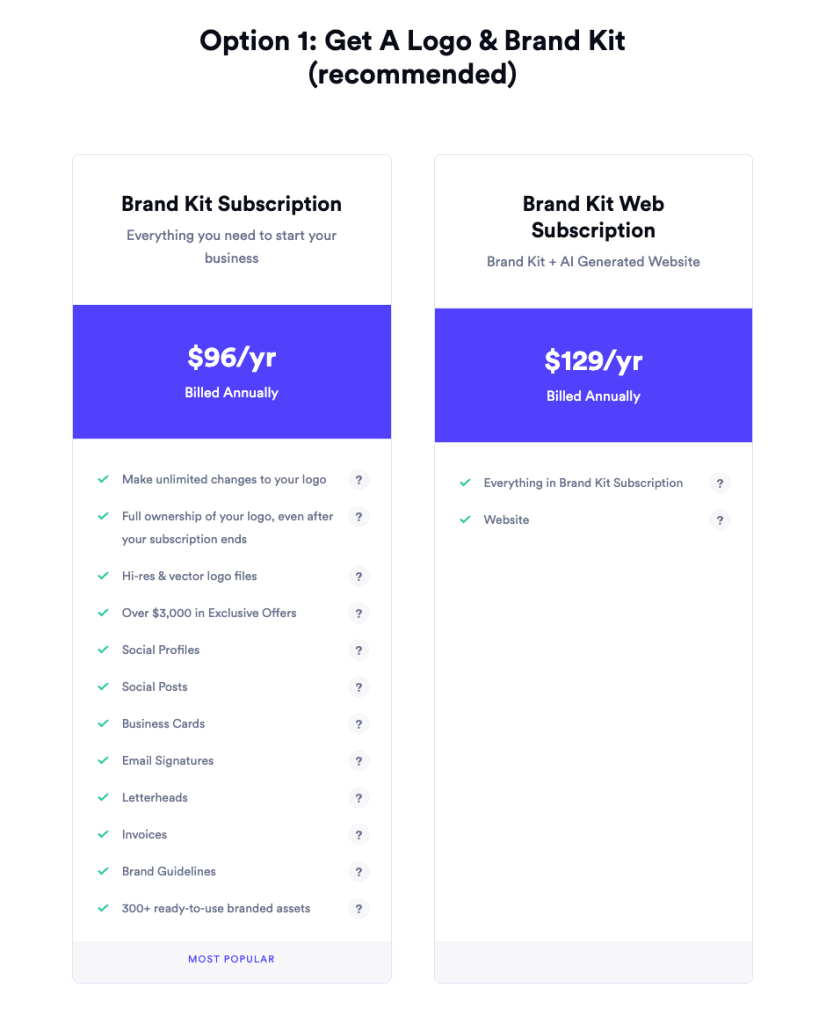
and
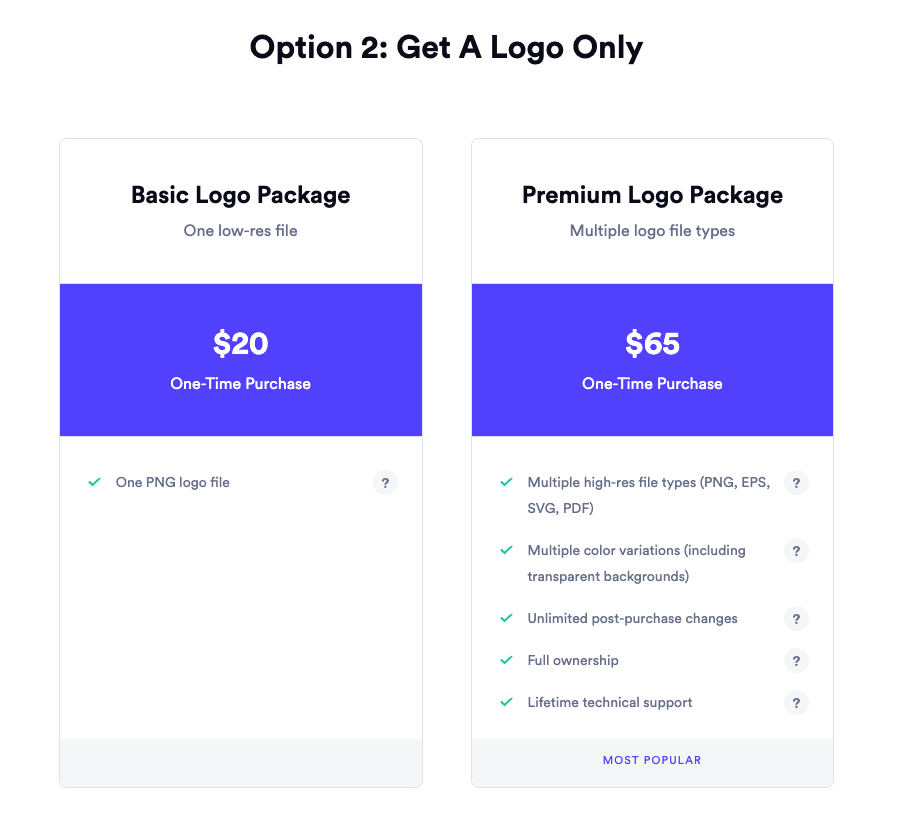
My advice for Option 2 is to get the Premium Logo Package. The unlimited post-purchase changes are well worth the extra dollars in case you change your mind or want more variations on your logo.
Pros
- Easy to use
- Creates professional-looking logos
- Variety of pricing plans
- Branded marketing materials
Cons
- Some logo designs can look generic
- Limited customization options
Overall
Looka is a great option for businesses that are looking for an easy-to-use and affordable way to create a professional-looking logo. The AI-powered logo generator is easy to use, and the editor is intuitive. Looka also offers a variety of branded marketing materials to help you promote your business.
Rating
I give Looka a rating of 4 out of 5 stars. It’s a great option for businesses that are on a tight budget or don’t have the time or resources to hire a professional designer. However, if you’re looking for a logo that is truly unique and personalized, you may want to consider hiring a professional designer.
In addition to the pros and cons mentioned above, here are some other things to consider when deciding whether or not to use Looka:
- Your brand identity: Looka is a great option for businesses that have a clear brand identity. If you know what your brand stands for and what you want your logo to look like, then Looka can help you create a logo that is consistent with your brand. However, if you’re not sure what your brand identity is, then Looka may not be the best option for you.
- Your target audience: Who are you trying to reach with your logo? If you’re targeting a business audience, then you’ll want to create a logo that is professional and sophisticated. However, if you’re targeting a younger audience, then you may want to create a logo that is more fun and creative.
- Your budget: Looka offers a variety of pricing plans to fit your needs. The Basic plan is free, but it is limited in features. The Premium plan costs $60 per year and includes all of the features of the Basic plan, plus branded marketing materials.
I hope this review has been helpful. If you have any questions, please feel free to leave a comment below or contact me by email. If you have been reading my earlier posts, it’s not hard to figure out how.

Leave a Reply